

智能巡检系统手机端-RCS是采用目前非常流行的VUE+uniApp+uView实现,其中地图定位与展示组件采用百度地图JSAPI WebGL相关技术实现。智能巡检系统手机端-RCS使用最新的前端技术栈,提供各类经过各种项目验证的实用的组件方便在业务开发时的调用。智能巡检系统手机端-RCS的核心业务功能是巡检打卡、巡检上报、路线查询等,感兴趣或者有相关技术能力的公司或个人可以基于此项目开发出适合自己的衍生项目。
本文档的作用只是起到抛砖引玉的作用,供广大爱好者或者相关行业工作者学习或借鉴。
rcs-mobile
├── common							#存放静态文件的目录
├── components					#符合vue组件规范的uni-app组件目录
├── js-sdk							#微信js-sdk
├── node-moudules				#用于构建和运行应用程序所需的Node.js模块
├── plugins						  #存放插件的目录
├── static							#存放静态文件的目录
├── unpackage					  #非工程代码,一般存放运行或发行的编译结果
├── util							  #util工具类
├── uview-ui					  #uView框架库
├── pages								#业务页面文件存放的目录
|  ├── index						#首页模块
|  ├── login						#登录模块
├── App.vue             #应用配置,用来配置App全局样式以及监听 应用生命周期
├── main.js             #Vue初始化入口文件
├── manifest.json       #配置应用名称、appid、logo、版本等打包信息
├── pages.json          #配置页面路由、导航条、选项卡等页面类信息
├── package.json				#node.js项目的配置文件,管理各种第三方包
├── README.md						#项目介绍
├── uni.scss            #这里是uni-app内置的常用样式变量
├── pages				#业务模块
|  ├── center		#我的(用户信息) 模块
|  |  ├── index.vue		#我的主页面
|  |  ├── modifyUserInfo.vue		#修改用户页面
|  ├── index		#首页模块
|  |  ├── index.vue		#首页主页面
|  |  └── reportContent.vue		#上报内容页面
|  ├── inspection		#巡检记录模块
|  |  └── inspectionRecord.vue		#巡检记录主页面
|  ├── login	#登录模块
|  |  ├── handset.vue 	#手机验证码登录页面
|  |  ├── login.vue 		#登录主页面
|  |  ├── register.vue 		#注册账号页面
|  |  └── resetPassword.vue		#找回密码页面
|  └── routinglist		#巡检路线模块
|     └── routinglist.vue		#巡检路线主页面
一个成熟的项目包含很多技术框架类的内容,例如组件库,自定义函数库,路由处理,多语言,UI样式等等。由于智能巡检系统是一个完整的项目,虽然业务功能点不多,但技术框架该有的基础功能已经基本涵盖,以下从两个个功能点代码进行讲解,起到抛砖引玉的作用,完整的代码学习还需要自行在项目中或者自行debug进行学习。
一般大部分手机端app常用的登录功能,包括用户注册、登录、忘记密码、第三方登录等。登录方式主要有账号密码登录、短信验证码登录、指纹识别登录、人脸识别登录等。互联网上的应用很多使用了第三方的一键登录,例如微信扫码登录、关注公众号登录、支付宝账号登录、短信息验证登录等等。但企业内部的应用系统,基本还是采用用户名及密码登录,为了防止暴力破解、保障登录功能的安全性常见的措施包括使用HTTPS协议进行数据传输加密,对用户密码进行加密存储,限制登录次数和频率,设置登录时的验证码等。前端代码如下:
<template>
	<view class="wrap">
		<view class="login-logo">
			<image :src="isDark ? '../../static/login-logo1.png': '../../static/login-logo.png'"></image>
			<view class="title">智能巡检系统-RCS</view>
		</view>
		<view class="content">
			<u-form>
				<u-form-item class="form-item">
					<u-icon name="account" class="login-icon"></u-icon>
					<u-input :custom-style="style" type="text" placeholder="请输入用户名" v-model="dataform.username" />
				</u-form-item>
				<u-form-item class="form-item">
					<u-icon name="lock" class="login-icon"></u-icon>
					<u-input :custom-style="style" type="password" placeholder="请输入密码" v-model="dataform.password" />
				</u-form-item>
				<button style="" @tap="submit" class="stake-btn u-m-t-50">登录</button>
			</u-form>
			<view class="alternative">
				<view class="issue" @click="forgetPassword">忘记密码</view>
			</view>
			<view class="alternatives">
				<view class="issues" @click="getregister">注册</view>
			</view>
			<!-- 多端登录 -->
			<view class="Multi-terminal-login">
				<view class="Multi-terminal-login-title">
					<text class="Multi-terminal-login-title-span1 Multi-terminal-login-title-span2"></text>
					<text class="Multi-terminal-login-title-span3">其它登录方式</text>
					<text class="Multi-terminal-login-title-span1"></text>
				</view>
				<view class="Multi-terminal-login-icon">
					<view class="Multi-terminal-login-title-icon1" @click="handsets">
						<text class="iconfont icon-shouji"></text>
						<text class="Multi-terminal-login-title-mobilephone">验证码登录</text>
					</view>
					<u-icon name="weixin-circle-fill" color="#03c863" size="58" class="Multi-terminal-login-title-icon2"
						@click="weixinlogin('weixin')"></u-icon>
					<u-icon name="zhifubao-circle-fill" color="#2979ff" size="58"
						class="Multi-terminal-login-title-icon2" @click="zhifubaologin"></u-icon>
				</view>
			</view>
		</view>
		<!-- Toast消息提示 -->
		<view class="top">
			<u-toast ref="uToast" />
		</view>
	</view>
</template>

<script>
	export default {
		data() {
			console.log(this.publicColor)
			return {
				checkedAccount: true,
				dataform: {
					username: '',
					password: '',
				},
				tel: '',
				style: {
					color: this.publicColor.fontColor
				},
				isDark: this.publicColor.isDark
			}
		},
		computed: {
			inputStyle() {
				let style = {};
				if (this.tel) {
					style.color = "#fff";
				}
				return style;
			}
		},
		onLoad() {
			this.checkToken()
		},
		mounted() {
			let that = this;
			//页面加载完成,获取本地存储的用户编码、用户名及密码
			const userName = uni.getStorageSync('username');
			if (userName) {
				that.dataform.username = userName;
			} else {
				that.dataform.username = '';
			}

		},
		methods: {
			submit() {
				var formdata = this.dataform
				var that = this
				// post请求,传入form表单数据
				this.$http.post('mobile/login', formdata).then(res => {
					if (res.data.code === 0) {
						uni.setStorageSync('token', res.data.data.token);
						this.$refs.uToast.show({
							// mask: true,
							title: '登录成功',
							type: 'success'
						});
						// 登录成功后2秒后,跳转到index(主页,首页)页面.
						setTimeout(function() {
							uni.switchTab({
								url: '/pages/index/index'
							});
						}, 2000)

						//登录成功将用户编码、用户名和 密码存储到用户本地
						if (that.checkedAccount) { //用户勾选“记住账号”
							uni.setStorageSync('username', that.dataform.username);
						} else { //用户没有勾选“记住密码”
							uni.removeStorageSync('username');
							that.dataform.username = '';
						}
						//更新设备信息
						that.updateUserClientInfo()

					} else if (res.data.code === 10040) {
						this.$refs.uToast.show({
							title: '域名未配置租户',
							type: 'warning'
						})
					} else {
						this.$refs.uToast.show({
							title: res.data.msg,
							type: 'error'
						})
					}
				}).catch(err => {})
			},
			//检查token
			checkToken() {
				let token = uni.getStorageSync("token")
				if (token == null || token == undefined || token.length == 0) {
					//#ifdef H5
					// this.h5Login()
					//#endif
					//	 MP  代表所有小程序
					//#ifdef MP-WEIXIN
					//如果是小程序  例如显示返回按钮
					//#endif
				} else {
					// TODO 增加token失效判断
					uni.switchTab({
						url: '/pages/index/index'
					});
				}
			},
			//忘记密码
			forgetPassword() {
				uni.navigateTo({
					url: '/pages/login/resetPassword'
				});
			},
			// 注册
			getregister() {
				uni.navigateTo({
					url: '/pages/login/register'
				});
			},
			// 跳转手机号登录页面
			handsets() {
				uni.navigateTo({
					url: '/pages/login/handset',
					fail: function(error) {
						console.log(error);
					}
				});
			},
			//更新用户的手机设备信息
			updateUserClientInfo() {
				var that = this
				//获取手机设备信息
				const clientInfo = plus.push.getClientInfo()
				uni.getSystemInfo({
					success: function(res) {
						let params = {}
						params.clientId = clientInfo.clientid; //设备唯一标识
						params.deviceType = res.platform; //设备类型
						params.deviceInfo = res; //设备信息
						//saveOrUpdate
						that.$http.post('/sys/userclient/saveOrUpdate', params).then(res => {
							if (res.data.code === 102) { //code:102 用户设备信息更新成功
								this.$refs.uToast.show({
									title: '用户设备信息更新成功',
									type: 'success'
								})
							}
						}).catch(err => {})
					}
				});
			},
			weixinlogin(e) {
				console.log('微信登录');
				let that = this;
				if (true) {
					// #ifdef APP
					uni.login({
						provider: e,
						success: function(loginRes) {
							console.log(loginRes )
							// 获取用户信息
							uni.getUserInfo({
								provider: e,
								success: function(infoRes) {
									that.api({
										url: 'Userlogin',
										method: 'post',
										data: {
											openid: infoRes.userInfo.openId,
											gender: infoRes.userInfo.gender,
											city: infoRes.userInfo.city,
											nickname: infoRes.userInfo.nickName,
											unionid: infoRes.userInfo.unionId
										}
									}).then(data => {
										//console.log(data)
										uni.setStorageSync('user_info', data.data
											.userinfo);

										uni.showToast({
											title: data.msg,
											icon: 'none'
										})
										that.openins();
										setTimeout(function() {
											//console.log('进去')
											uni.switchTab({
												url: '/pages/index/index'
											})
										}, 1000)
									})
								}
							});
						}
					});
					// #endif

					// #ifdef H5
					let that = this
					if (that.info) {
						that.api({
							url: 'Userlogin',
							method: 'post',
							data: {
								openid: that.info.openid,
								gender: that.info.sex,
								city: that.info.city,
								nickname: that.info.nickname,
								unionid: that.info.unionid
							}
						}).then(data => {
							//console.log(data)
							uni.setStorageSync('user_info', data.data
								.userinfo);
							if (!this.$u.test.isEmpty(data.data.userinfo.technician)) {
								uni.setStorageSync('pagetype', 2)
							}

							uni.showToast({
								title: data.msg,
								icon: 'none'
							})
							that.openins();
							setTimeout(function() {
								//console.log('进去')
								location.href = process.env.NODE_ENV === 'development' ?
									"http://kiana.vaiwan.com" : "http://www.renanjia.com/index.html";
							}, 1000)
						})
					}
					// #endif
				} else {
					uni.showToast({
						title: '请同意协议后再登录',
						icon: 'none'
					})
				}
			},
			zhifubaologin() {
				console.log('支付宝登录');
				// #ifdef APP
				console.log(plus.os.name);
				//相关示例代码:(该代码会打开支付宝授权,授权之后会在支付宝中打开你所设置的【回调地址】网页)
				//***********************
				//***url授权地址由后端拼接也可以前端写死***
				//***以下是一个拼接示例,仅需修改app_id的值和redirect_uri的值***
				//***app_id是商户的APPID,redirect_uri是页面跳回地址(授权成功之后会在支付宝中打开这个地址)***
				//***********************
				let urls =
					'https://openauth.alipay.com/oauth2/publicAppAuthorize.htm?app_id=2021001183611007&scope=auth_userinfo&redirect_uri=https://shandianlaoshi.com/api/user/zfb_url';
				urls = encodeURIComponent(urls); //将地址编码成浏览器访问的格式
				// 判断平台
				if (plus.os.name == 'Android') {
					plus.runtime.openURL(
						'alipays://platformapi/startapp?appId=20000067&url=' + urls,
						res => {
							//这里写打开URL地址失败后的处理
							console.log(res);
							uni.showModal({
								content: '本机未检测到对应客户端,是否打开浏览器访问页面?+ Android',
								success: function(res) {
									if (res.confirm) {
										plus.runtime.openURL();
									}
								}
							});
						},
						'com.eg.android.AlipayGphone'
					);
				} else if (plus.os.name == 'iOS') {
					plus.runtime.openURL(
						'alipay://platformapi/startapp?appId=20000067&url=' + urls,
						res => {
							console.log(res);
							uni.showModal({
								content: '本机未检测到对应客户端,是否打开浏览器访问页面?+ ios',
								success: function(res) {
									if (res.confirm) {
										//plus.runtime.openURL(url);
									}
								}
							});
						},
						'com.eg.android.AlipayGphone'
					);
				}
				// #endif
			}

		}
	};
</script>
页面效果如下:
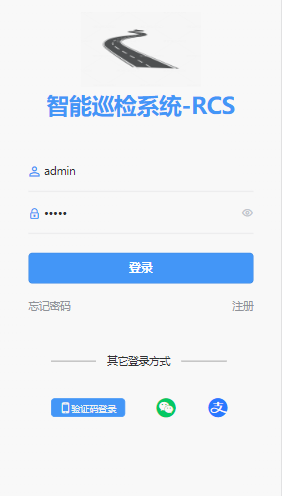
以上代码包含了登录页面的布局和逻辑。在模板部分,使用了uniapp库和uView框架的组件来构建登录表单。其中包括了用户名、密码输入框,忘记密码和注册跳转页面链接,以及一个提交按钮。在页面的下方,是其他登录方式,包含了手机验证码登录、微信登录及支付宝登录。通过v-model指令将输入框的值与data中的dataForm对象进行双向绑定,使得输入框的值可以实时更新到dataForm对象中。
在脚本部分,然后定义了组件的data属性,包括了多语言消息、验证码图片和表单数据。其中,dataForm对象包含了用户名、密码,其他属性例如手机号、颜色样式等。
computed属性定义了样式属性inputStyle,用来控制输入框的背景颜色。
在onLoad生命周期中,调用了checkToken方法来校验token。
在mounted生命周期中,获取本地存储的用户编码、用户名。
submit方法是表单提交的处理函数,this.http.post方法向服务器发送登录请求,根据服务器返回的结果进行处理,如果登录成功则将用户名账户保存到本地,并跳转到首页,同时调用updateUserClientInfo更新用户设备信息。
forgetPassword方法,忘记密码时,点击跳转到找回密码页resetPassword.vue。
getRegister方法,点击跳转到注册页面register.vue。
handsets方法,点击跳转到手机验证码登录页handset.vue。
updateUserClientInfo方法,更新用户的手机设备信息。先调用getClientInfo获取当前用户手机设备信息,然后调用that.$http.post请求后台接口saveOrUpdate更新用户设备信息。
wechatLogin微信登录方法,登录功能目前在开发中。
aliPayLogin支付宝登录方法,登录功能目前在开发中。
<template>
	<view class="wrap">
		<view class="top">
			<u-toast ref="uToast" />
		</view>
		<view class="content">
			<view class="title">手机号登录</view>
			<u-form :model="dataform">
				<u-form-item>
					<u-input type="number" :custom-style="style" placeholder="请输入手机号" v-model="dataform.mobile"
						maxlength="11" />
				</u-form-item>
				<u-form-item>
					<u-input type="number" :custom-style="style" placeholder="请输入验证码" v-model="dataform.verifyCode"
						class="test-input" maxlength="6" :disabled="disabled">
					</u-input>
				</u-form-item>
				<button class="stake-btn-handset" :class="disabled ? '' : 'stake-btn-handset-test'"
					@click="sendCode">{{ countdown > 0 ? countdown + 's重新获取' : '获取验证码' }}</button>
				<button class="stake-btn u-m-t-50 stake-btn-s" @click="getlogin">登录</button>
			</u-form>
		</view>
	</view>

</template>

<script>
	export default {
		data() {
			return {
				show: false,
				countdown: 0,
				dataform: {
					mobile: '', //手机号
					verifyCode: '', //验证码
				},
				style: {
					color: this.publicColor.fontColor,
				},
				// 禁用输入框
				disabled: true
			}
		},

		methods: {
			sendCode() {
				//计时结束前不能重复获取短信验证码  by hutao
				if (this.countdown > 0) {
					return false;
				}

				// 校验手机号是否为空
				if (!this.dataform.mobile) {
					this.$refs.uToast.show({
						title: '手机号不能为空',
						type: 'error'
					})
					return false;
				}
				// 校验手机号格式
				const regex = /^[1][3,4,5,6,7,8,9][0-9]{9}$/; // 正则表达式,限制密码只能包含字母、数字、下划线和减号,长度为6-18个字符
				if (!regex.test(this.dataform.mobile)) {
					this.$refs.uToast.show({
						title: '手机号格式不正确',
						type: 'error'
					})
					return false;
				}
				// 待删除
				this.disabled = false
				this.countdown = 60
				let timer = setInterval(() => {
					if (this.countdown > 0) {
						this.countdown--
					} else {
						clearInterval(timer)
					}
				}, 1000)
				// 发送验证码请求
				let params = {} //参数手机号
				params.mobile = this.dataform.mobile
				return false;
				this.$http.post('/sendVerificationCode', params).then(res => {
					if (res.data.code === 0) {
						this.disabled = false
						// 发送验证码成功,开始倒计时
						this.countdown = 60
						let timer = setInterval(() => {
							if (this.countdown > 0) {
								this.countdown--
							} else {
								clearInterval(timer)
							}
						}, 1000)
					} else {
						console.log(res.data.msg)
						this.$refs.uToast.show({
							title: 'res.data.msg',
							type: 'error'
						})
					}
				}).catch(err => {})
			},
			getlogin() {
				// 校验手机号是否为空
				if (!this.dataform.mobile) {
					this.$refs.uToast.show({
						title: '手机号不能为空',
						type: 'error'
					})
					return false;
				}
				var formdata = this.dataform
				var that = this
				// post请求,传入form表单数据 ,请求接口要改
				this.$http.post('mobile/login', formdata).then(res => {
					if (res.data.code === 0) {
						uni.setStorageSync('token', res.data.data.token);
						this.$refs.uToast.show({
							// mask: true,
							title: '登录成功',
							type: 'success'
						});
						// 登录成功后2秒后,跳转到index(主页,首页)页面.
						setTimeout(function() {
							uni.switchTab({
								url: '/pages/index/index'
							});
						}, 2000)

					} else {
						this.$refs.uToast.show({
							title: res.data.msg,
							type: 'error'
						})
					}
				}).catch(err => {})
				if (this.dataform.mobile != '' && this.dataform.verifyCode == 123456) {
					// 登录成功后2秒后,跳转到index(主页,首页)页面.
					setTimeout(function() {
						uni.switchTab({
							url: '/pages/index/index'
						});
					}, 2000)
				}
			}
		}
	}
</script>
页面效果如下:
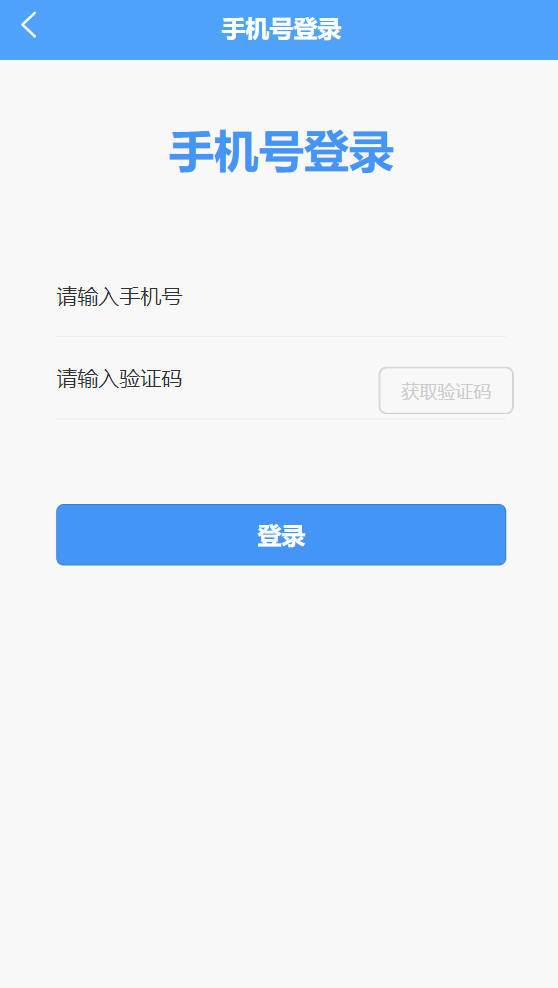
以上代码实现了用手机号、验证码登录的功能。在模板部分,登录表单包括了手机号、验证码输入框,获取验证码按钮,以及一个登录按钮。其中获取验证码后的有效期为60秒,短信验证码失效后,需要点击重新获取。
在脚本部分,定义了页面组件的data属性,包括了颜色样式属性、验证码图片和表单数据。其中,dataForm对象包含了手机号和短信验证码。
sendCode方法,发送短信验证码方法。首先判断手机号是否为空,并且校验手机号格式,为空或者 格式不正确,给出对应提示。然后传递参数请求后台发送短信验证码接口,返回成功时,创建一个60秒的定时器用来读数(注:当读数结束前,不能重复调用获取发送短信验证码方法sendCode)。
getLogin方法是请求后台的手机号登录接口,传递手机号和短信验证码参数,调用this.http.post方法向服务器发送登录请求,根据服务器返回的结果进行处理,如果登录成功则将token保存到Cookies中,并跳转到首页,否则显示错误信息。
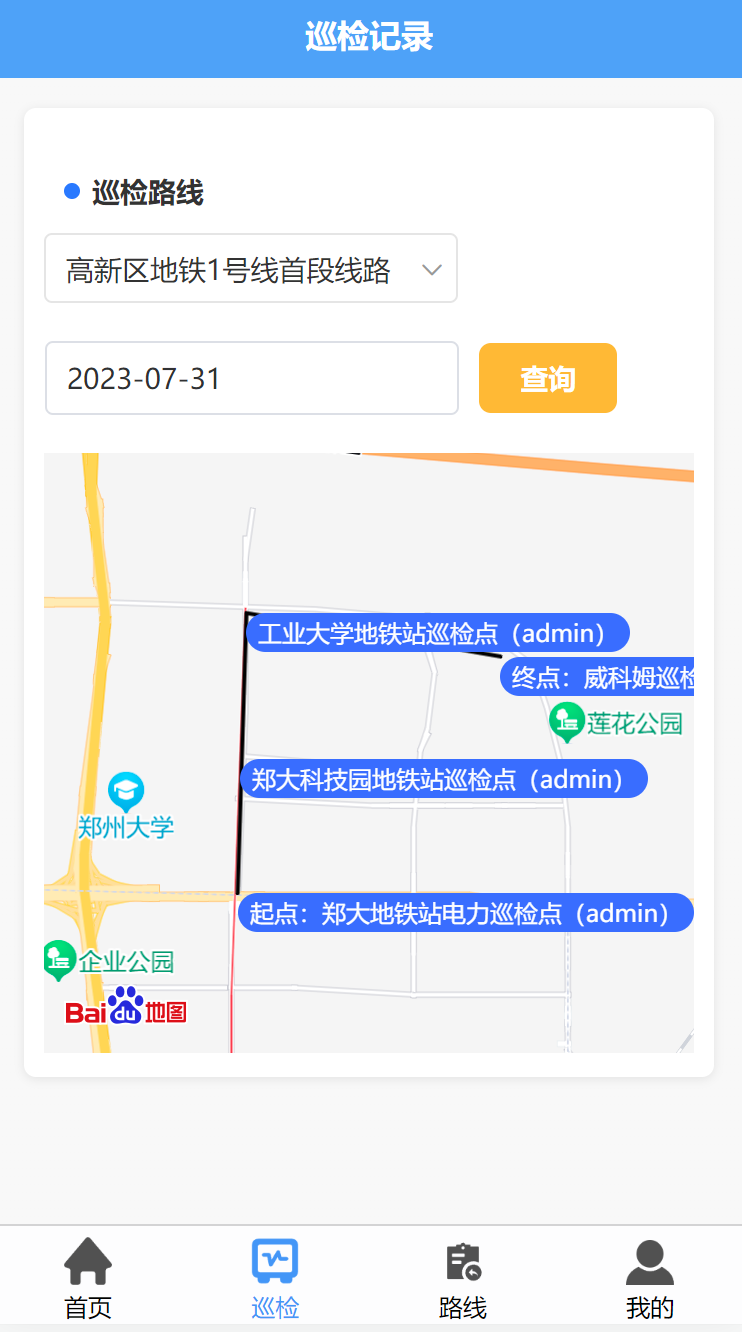
维护、查询巡记录时,首先需要选择巡检路线、巡检日期,然后点击查询按钮,动画显示巡检员对应的路线轨迹。以下是巡检记录的app端代码:
<template>
	<view>
		<view class="main-container">
			<view class="top">
				<u-toast ref="uToast" />
			</view>
			<view class="section_routing">
				 <uni-section title="巡检路线" type="circle">
					  <uni-data-select
						v-model="selectRoutingId"
						:localdata="routingDataList"
						@change="changeRoutingEvent"
						:clear="false"
					  ></uni-data-select>
				</uni-section>
			</view>
			<view class="serarchDiv">
				<u-calendar v-model="showInspectionDateVisible" mode="date"
					@change="changeInspectionDate"></u-calendar>
				<u-input v-model="dataForm.inspectionDate" type="text" :disabled="true" placeholder="请选择巡检日期"
					:border="true" @click="showInspectionDateVisible = true" />
			</view>
			<view class="search-btn" @click="getInspectionDataEvent">
				查询
			</view>

			<!-- 巡检记录基本信息  v-if="isShowRecordInfo" -->
			<view v-if="isShowRecordInfo">
				<view class="main-item">
					<view class="u-flex u-flex-row">
						<text class="routine-check-title">巡检记录基本信息</text>
						<view class="close_point_info">
							<u-icon name="close-circle"  size="40" @click="closeRecordInfoEvent"></u-icon>
						</view>
					</view>
					<view class="u-flex-row">
						<text class="item-name">路线名称</text>
						<view class="item-value">
							<text>{{inspectionInfo.routingName}}</text>
						</view>
					</view>
					<view class="u-flex-row">
						<text class="item-name">巡检单号</text>
						<view class="item-value">
							<text>{{inspectionInfo.oddNumbers}}</text>
						</view>
					</view>
					<view class="u-flex-row">
						<text class="item-name">巡检点名称</text>
						<view class="item-value">
							<text>{{inspectionInfo.pointName}}</text>
						</view>
					</view>
					<view class="u-flex-row">
						<text class="item-name">巡检日期</text>
						<view class="item-value">
							<text>{{inspectionInfo.inspectionDate}}</text>
						</view>
					</view>
					<view class="u-flex-row">
						<text class="item-name">巡检人</text>
						<view class="item-value">
							<text>{{inspectionInfo.currentInspector}}</text>
						</view>
					</view>
					<view class="u-flex-row">
						<text class="item-name">经纬度</text>
						<view class="item-value">
							<text><span style="font-weight:bold;font-size:26rpx">经度:</span>{{inspectionInfo.currentInspectorLongitude}}</text><br>
							<text><span style="font-weight:bold;font-size:26rpx">纬度:</span>{{inspectionInfo.currentInspectorLatitude}}</text>
						</view>
					</view>
					<view class="u-flex-row">
						<text class="item-name">上报内容</text>
						<view class="item-value">
							<text>{{inspectionInfo.reportContent}}</text>
						</view>
					</view>
				</view>
			</view>

			<!-- 地图区域 -->
			<view class="page-box u-p-20">
				<view id="baiduMapView" class="map-contain">
				</view>
			</view>

		</view>

		<!-- 测试方法,测试map的相关方法 -->
		<view class="u-flex u-row-between main-item">
			<!-- #ifdef APP-PLUS || H5 -->
			<view :prop="pointDataList" :change:prop="map.addPointMark"></view>
			<view :props="inspectionDataList" :change:props="map.addInspectionMark"></view>
			<!-- #endif -->
			<!-- #ifndef APP-PLUS || H5 -->
			<view>非 APP、H5 环境不支持</view>
			<!-- #endif -->
		</view>

	</view>
</template>

<script>
	import loadPage from '@/util/loadPage.js';
	export default {
		mixins: [loadPage],
		onLoad() {
			var that = this
			console.log('开始进入逻辑层onLoad方法,这是常规的script 而不是rederjs 如果需要通信,需要用别的方式');

		},
		onShow() {
			let that = this
			//获取当前日期
			let nowDate = this.$dateUtil.getNowDate(0, 'YYYY-MM-DD');
			this.dataForm.inspectionDate = nowDate
			Promise.all([
				that.getRoutingDataList()
			]).then(() => {});

		},
		data() {
			return {
				initial: {
					createdIsNeed: false, // 此页面是否在创建时,调用查询数据列表接口?
				},
				routingDataList: [], //巡检路线集合
				selectRoutingId: '',//选中的巡检路线ID,默认第一条
				selectRoutingName: '',//选中的巡检路线名称
				pointDataList: [], //巡检点数据集合
				showInspectionDateVisible: false, //巡检日期日历组件
				inspectionDataList: [], //巡检记录集合
				dataForm: {
					inspectionDate: '', //巡检日期
					routingId: '', //巡检路线ID
				},
				//位置信息
				positionInfo: {
					address: '',
					longitude: '', //经度
					latitude: '' //纬度
				},
				//巡检路线信息
				routingInfo: {
					id: '',
					routingName: '', //路线名
					teamsId: '', //班组id
					teamsName: '', //班组名称
					startPoint: '', //纬度
					endPoint: '',
					remark: '',
					enableflag: '', //是否可用 (0:否  1:是)
					teamUserNames: '', //班组成员姓名
					teamUserIdList: [], //班组成员ID
				},
				//巡检点基本信息
				pointInfo: {
					id: '',
					code: '',
					name: '',
					pointType: '', //巡检点类型 (消防类、物业类、电力类等)
					positionName: '',//位置名称
					longitude: '', //经度
					latitude: '', //纬度
					clockInRange: '',
					clockInFrequency: '',
					remark: '',
					enableflag: 1, //是否可用 (0:否  1:是)
					pointTypeLabel: '', //标桩类型的label
				},
				//巡检记录信息
				inspectionInfo: {
					id: '',
					inspectionDate: '', //巡检日期
					oddNumbers: '', //巡检单号
					pointId: '', //巡检点ID
					pointName: '', //巡检点名称
					currentInspector: '', //当前巡检人
					currentInspectorLongitude: '', //当前巡检人经度
					currentInspectorLatitude: '', //当前巡检人纬度
					deviceInfo: '', //设备信息
					clockInTime: '', //打卡时间
					recordType: '',//数据记录类型 (1:进入 2:离开 3:上报)
					reportContent: '', //上报内容
				},
				//是否展示巡检记录基本信息
				isShowRecordInfo: false,
			}
		},
		methods: {
			//===================== 巡检点数据处理 相关method start ==============

			// 接收renderjs发回的数据
			receiveRenderData(clickRecordInfo) {
				console.log('receiveRenderData====>', clickRecordInfo);
				if (clickRecordInfo && clickRecordInfo.pointName) {
					this.isShowRecordInfo = true
					this.inspectionInfo = clickRecordInfo
				} else {
					this.isShowRecordInfo = false
				}
			},
			receiveIsShowRecordInfo(isShowRecordInfo) {
				this.isShowRecordInfo = isShowRecordInfo
			},
			//选中巡检路线事件
			changeRoutingEvent(val){
				let that = this
				//1.巡检路线基本信息
				if(val){
					that.selectRoutingId = val
					that.dataForm.routingId = val
					for (let i = 0; i < that.routingDataList.length; i++) {
						let routingItem = that.routingDataList[i];
						if(routingItem.id == val){
							this.routingInfo = routingItem;
						}
					}
				}
				//2.清空巡检点数据
				that.pointDataList = [];
				//3.查询路线上的巡检点 并 标记、画线
				that.getPointDataList();
			},
			//选择巡检日期
			changeInspectionDate(e) {
				let inspectionDate = e.result;
				this.dataForm.inspectionDate = inspectionDate;
			},
			//关闭巡检点信息事件
			closeRecordInfoEvent(){
				if(this.isShowRecordInfo){
					this.isShowRecordInfo = false
				}
			},
			//获取下拉框巡检路线数据
			getRoutingDataList(){
				let that = this
				this.$http.get('mobile/routinecheckrouting/list').then(res => {
					if (res.data.code === 0) {
						that.routingDataList = res.data.data;
						//组装数据
						if(that.routingDataList.length > 0){
							for (let i = 0; i < that.routingDataList.length; i++) {
								let routingItem = that.routingDataList[i];
								routingItem.value = routingItem.id;
								routingItem.text = routingItem.routingName;
							}
						}
						//默认选中第一条路线
						that.selectRoutingId = that.routingDataList[0].id
						that.dataForm.routingId = that.selectRoutingId
						that.selectRoutingName = that.routingDataList[0].routingName
						that.changeRoutingEvent(that.selectRoutingId)
						console.log(that.routingDataList)
					}

				}).catch(err => {
					console.log(err)
				})
			},
			//获取巡检点数据
			getPointDataList() {
				let that = this
				this.$http.get('mobile/routinecheckpoint/list', {
					data: {
						routingId: that.selectRoutingId
					}
				}).then(res => {
					//获取point_type标桩类型的字典数据
					let dictList = uni.getStorageSync("dictList");
					let pointDictList = [];
					for (let i = 0; i < dictList.length; i++) {
						if ("point_type" == dictList[i].dictType) {
							pointDictList = dictList[i].dataList;
						}
					}
					if (res.data.code === 0) {
						that.pointDataList = res.data.data;
						//pointDataList的巡检点数据,组装point_type的label
						for (let i = 0; i < that.pointDataList.length; i++) {
							let pointItem = that.pointDataList[i];
							for (let j = 0; j < pointDictList.length; j++) {
								let dictItem = pointDictList[j];
								if (pointItem.pointType == dictItem.dictValue) {
									pointItem.pointTypeLabel = dictItem.dictLabel
								}
							}
							if(pointItem.positionName == that.routingInfo.startPoint){
								pointItem.startPoint = pointItem.positionName
							}else{
								pointItem.startPoint = ''
							}

							if(pointItem.positionName == that.routingInfo.endPoint){
								pointItem.endPoint = pointItem.positionName
							}else{
								pointItem.endPoint = ''
							}
						}
						console.log(that.pointDataList)
					}

				}).catch(err => {
					console.log(err)
				})
			},
			//获取巡检记录
			getInspectionDataEvent(){
				let that = this
				if(that.pointDataList.length < 1){
					return that.$refs.uToast.show({
						title: '请切换巡检路线!',
						type: 'warning'
					})
				}

				this.$http.get('mobile/routinecheckrecord/getInspectionDataList',{
					data: {
						...this.dataForm
					}
				}).then(res => {
					if (res.data.code === 0) {
						that.inspectionDataList = res.data.data;
						console.log(that.inspectionDataList)
						//传递到renderjs

					}

				}).catch(err => {
					console.log(err)
				})
			},
			//===================== 巡检点数据处理 相关method end ==============
		}
	}
</script>
页面效果如下:
点击巡检点“起点”label,展示当前巡检点信息,如下图所示:
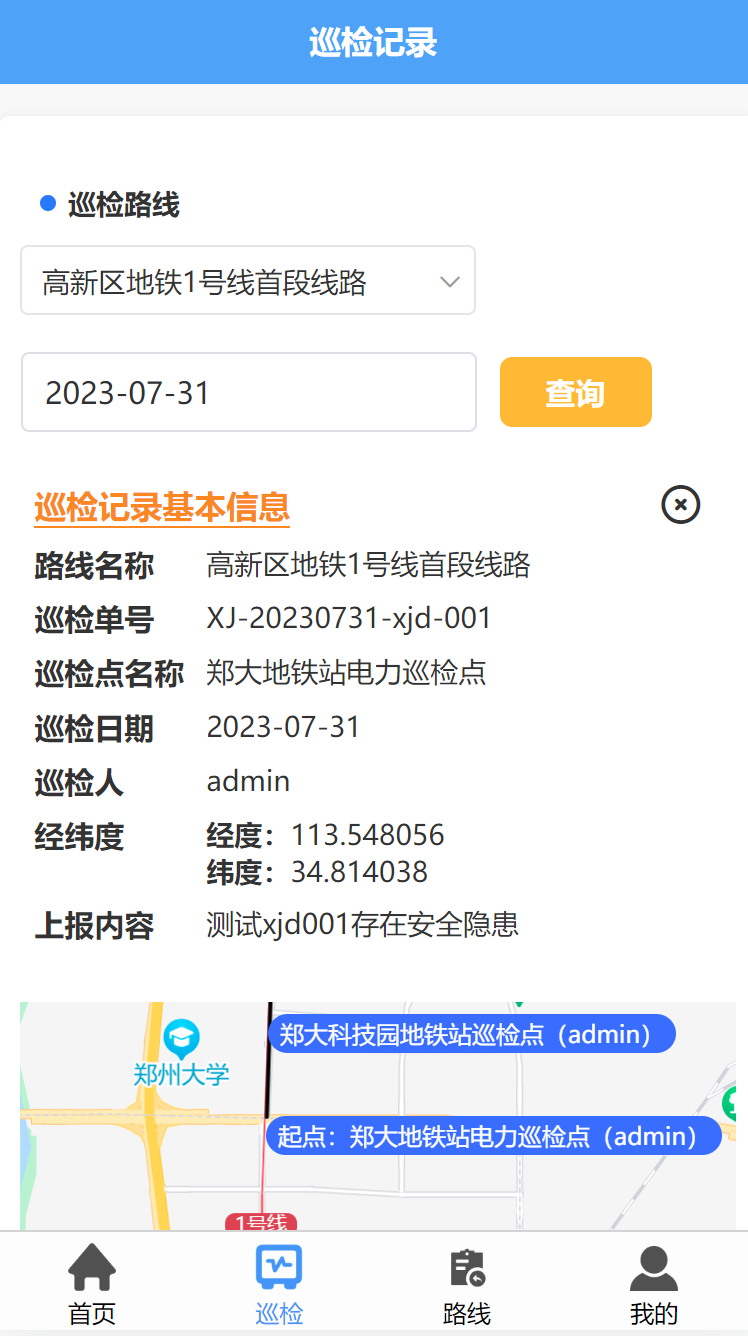
以上代码是展示对应巡检记录路线的地图组件页面,动画展示地图导航的路线效果,主要功能就是调用百度地图组件SDK展示地图,然后根据路线id、巡检日期、巡检人员(默认为当前用户),来获取当天的巡检记录数据,根据巡检点的经纬度信息,通过百度地图SDK的相关方法,进行描点、标记信息、连线;最后动画展示巡检记录路线图效果。
在脚本中,作了分层处理:分为逻辑成 和 渲染层。其中,逻辑层主要用来获取页面数据、处理用户相关操作;渲染层,主要用来加载百度地图组件,使用了renderjs进行渲染,并且在地图上标记、描点、连线,添加动画效果。
onLoad生命周期,页面开始进入逻辑层方法,这是常规的script,进入页面时只加载一次,相当于页面初化入口。
onShow生命周期,页面显示时触发(页面被调用时),用来获取当前日期,并获取巡检路线数据。
在定义组件data属性中,主要包含了巡检路线数据集合、默认选择的巡检路线、巡检记录数据集合、dataForm表单、位置信息对象、巡检路线信息对象、巡检点基本信息对象、巡检记录信息对象等属性。
methods定义了一些方法:
receiveRenderData 和 receiveIsShowRecordInfo方法,用于接收renderjs发回的数据。
changeRoutingEvent方法,用于选中巡检路线。
changeInspectionDate方法,用于选择巡检日期。
closeRecordInfoEvent方法,用于关闭巡检点信息。
getRoutingDataList方法,用于获取巡检点数据。
getInspectionDataEvent,用于获取巡检记录数据。
首页在定义组件data属性中,主要包含了百度地图sdk的ak密钥、巡检点基本信息对象、当前位置信息对象等属性。
addInspectionMark方法,根据查询后台返回的routineCheckPointList巡检点数据集合,在地图上添加标记点、添加标注信息、连线。
mounted生命周期,用来初始百度地图组件的方法。
postMessage 和 postIsShowRecordInfo方法,用于发送数据到逻辑层。
clickRecordHandler方法,点标记点marker,展示经纬度、位置等信息。
clickRecordLableHandler方法点击标记点label,展示巡检点基本信息。
testDrawLine方法,开启标记点marker连线的动画效果。
扫码关注不迷路!!!
郑州升龙商业广场B座25层
service@iqiqiqi.cn

联系电话:187-0363-0315
联系电话:199-3777-5101